
 FREE Trial FREE Trial
Buy Now
Features
Training
hotComm:
Lite Standard Multi Pro
Presenter Pro Support Pro Presenter Pro
Plus hotComm CL SuperJava hotMeeting
IM-Live Dynamic Desktop ezPeer
Call Group Manager Content Relay Manager
Proxy Server
|
 |
|
Update eTSO CL
a hotComm client for eTradeShowsOnline
eTSO CL is a special version of the hotComm CL Windows product. You can download and install it and use it in hotComm rooms and events that allow hotComm CL or eTSO CL.
An update replaces files in your existing eTSO CL installation. You do not need to uninstall before updating.
| Note for Kaspersky users -- please configure Kaspersky for hotComm again after you upgrade, per our instructions at www.hotcomm.com/FAQ/FAQ_kaspersky.asp |
The current revision is: 7.30.010x (4.8Mb)
 |
Do not uninstall before updating.
Select Open or Run, not Save.
You MAY need to re-start your computer after some updates.
Delete Temporary Internet Files after updating.
|
If you ran the update and still get a message saying you need to update, it usually means that you have a copy of the old installer saved on your computer. Follow instructions below and try again.
How to Update
To update eTSO CL:
- Delete all copies of the old installer (etsosetup.exe) that may have been saved on your computer. How to ...
- Delete Temporary Internet files. How to ...
- Click the Update button. When you get the File Download window, select Open or Run instead of Save.
|
Do not uninstall before updating.
Select Open or Run, not Save.
You MAY need to re-start your computer after some updates.
|
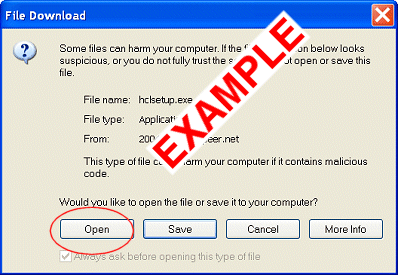
- Run the installer (etsosetup.exe). If you selected Run or Open, it starts automatically. Follow instructions in the installation screens.
- At the end of the installation program, eTSO CL starts.
If your privacy or security products challenge eTSO CL or hotComm, always allow hotComm to access any site.
Security and Privacy product note: Check your privacy and security products to make sure that they allow hotComm to access the Internet, and also allow you to access these addresses: hotComm.com, ezPeer.net, 1stWorks.com, eTradeShowsOnline.com. For information about some firewall products, see Firewalls.
About the Update Notice
The Update notice means that your copy of eTSO CL is not updated to the revision required for the room you want to join.
Your revision number is shown on the top line of your eTSO CL window.
If you ran the update, but get the "Update required" notice again, you probably have an old copy of the installer saved on your computer. (Windows is running the saved copy instead of the new one you just downloaded.) To fix this, delete any saved copies of etsosetup.exe, delete Temporary Internet Files, and try again.
How to Delete Saved Installers
Find and delete all copies of the installation program (etsosetup.exe):
- Open the Windows Start menu. Select Search or Find.
- Select Files and folders, and type etsosetup*.exe as the filename. Click Search.
- Highlight all files that were found and press the Delete key.
- Close the search or find windows.
Return to How to Update
Auto Updates
Dial-up and Satellite users should disable eTSO CL auto updating, for speed reasons. To do this:
- Start eTSO CL.
- Click Options, then Software Update Setup.
- In the About eTSO CL window, uncheck Allow Auto Update and Allow Auto Download.
How to Delete Temporary Files
Windows Control Panel
Internet Explorer
FireFox (Mozilla)
AOL
Netscape
How do I delete Temporary Internet Files (clear cache)?
Instructions are provided for deleting temporary Internet Files (clearing cache) through
Windows Control Panel,
Internet Explorer,
Firefox,
Safari,
Opera,
AOL and
Netscape.
Updated 9/30/08
Return to How to Update
|
|




 Try it Out