hotTweet
The hotTweet feature lets you send the same post simultaneously into a room and to your Twitter account.
The hotTweet feature is included in hotComm Pro, and available as an extra-cost, add-on feature in hotComm Standard:
| Product |
Included |
| hotComm Pro |
Included |
| hotComm Standard |
Add-on feature, extra cost |
| hotComm Lite |
Not available |
| hotComm CL |
Not available |
You do NOT need to be a moderator to use it.
You must have a Twitter account to post to.
The hotTweet feature is available in hotComm revision 8.0.010x * NOW live on our site HERE *
If you have questions, please contact hotComm Support, at hotComm Support
...OR...Follow the steps below to TWEET directly from your hotComm room to your Twitter account with a designated key sequence you choose...
NOTE - Currently hotComm Pro has hotTWEET inclusive for hotComm Standard users - if your Moderator allows for a student/user/participant/trader in their room to post TWEETS to the trade room they are connected to.
If you are a room owner or moderator, you are not subject to the session controls that can prevent a hotComm STD user from using the hotTweet feature in a live session you are leading.
Moderators and room owners can TWEET directly into their Twitter feeds from their hotComm traderooms or a webinar on hotComm that they have moderator status in.
Setup
In hotComm Pro or hotComm Standard:
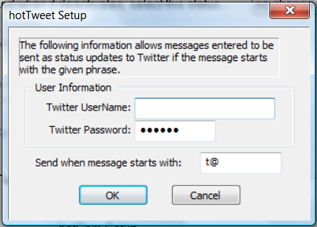
- Click Options, then Preferences, check Enable hotTweet, and click Settings.
- Type in the UserName and Password of your Twitter account.
- For Send when message starts with: , type in a prefix that will tell hotComm this is to be posted to Twitter as well as into the room. To avoid accidentally sending posts to Twitter, choose a prefix that you would not use normally. Note: the prefix will appear in the message posted in the room.
- Click OK.
Use in room
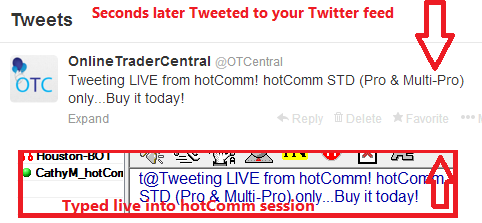
Type the prefix you chose (such as t@) followed by your message and press Enter.
For example:
hotComm Standard hotTweet feature license:
You can buy a hotTweet license to enable the hotTweet feature on the hotComm website at http://hotcomm.com/order.asp. The unlock code can only be used once.
The hotTweet feature license is a perpetual license that is good for the lifetime of the original hotComm registration (original means the hotComm registration you put the unlock code into). You do not need to renew it. It can not be transferred to another hotComm registration or email address.
The hotTweet feature is included in hotComm exports, including exports you make yourself (click Registration, then Export Identity), and in the automatic export that we make when you put in a new unlock code. Therefore, when you import an export made from a hotTweet activated copy of hotComm, hotTweet is included.